what is a visual bookmark manager and how does it work
A visual bookmark manager is a tool that saves websites using images or thumbnails instead of plain text. This makes browsing faster, more intuitive, and more enjoyable
Last updated:
December 7, 2025
What Is a Visual Bookmark Manager and How Does It Work?
Designers, developers, marketers, and creative teams save hundreds of links every month — from websites to UI inspiration, articles, tools, and resources. But traditional browser bookmarks quickly turn into cluttered lists of text and folders.
This is where a visual bookmark manager comes in.
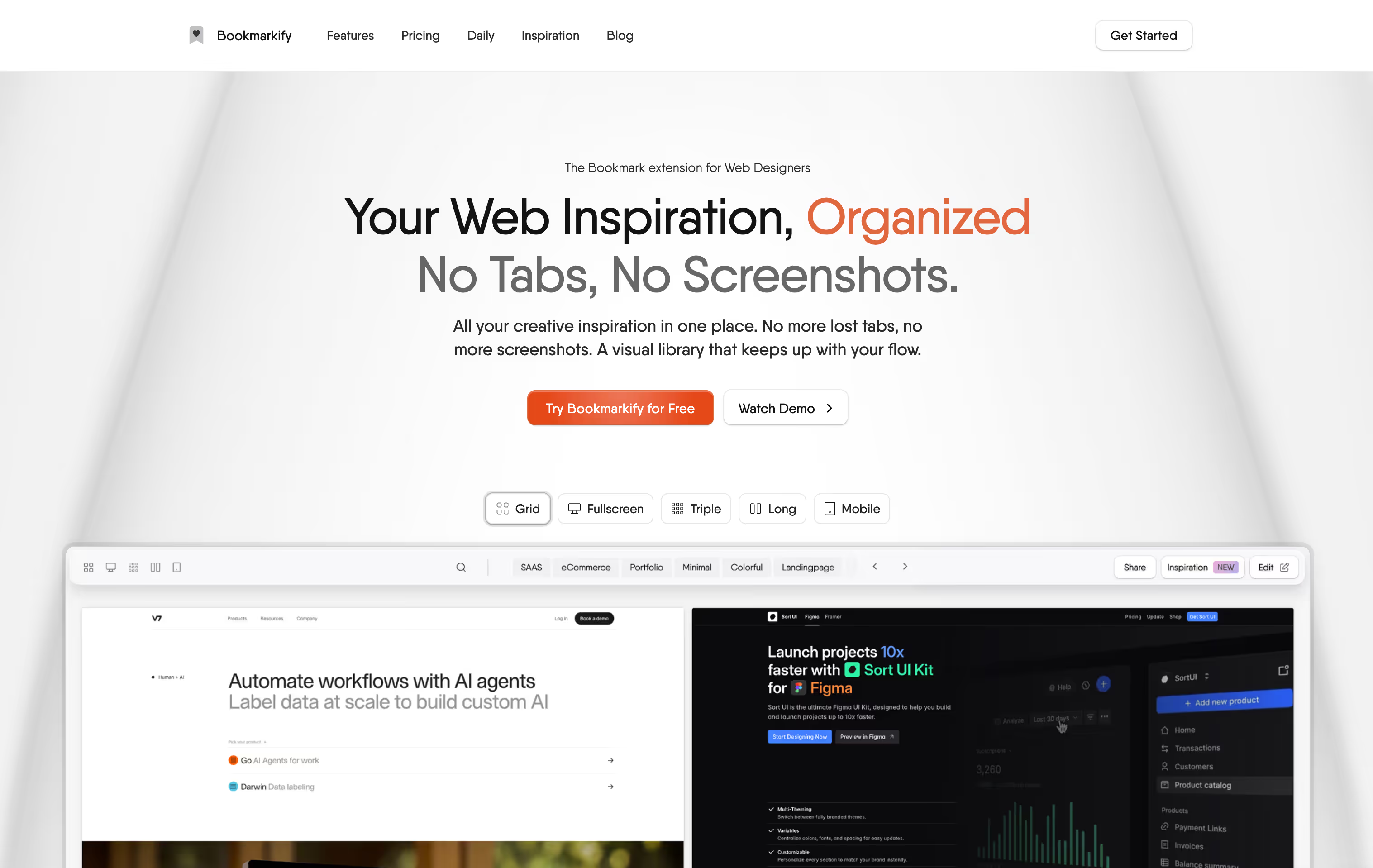
A visual bookmark manager transforms the way you save and organize online content by turning every bookmark into a beautiful visual card. Instead of digging through plain text, you browse a clean grid of screenshots, thumbnails, or preview images — making it easier and faster to recognize the content you’ve saved.
In this article, you’ll learn what a visual bookmark manager is, why it’s useful, and how Bookmarkify elevates the experience for digital creatives.
What Is a Visual Bookmark Manager?
A visual bookmark manager is a bookmarking tool that organizes your saved links using images instead of text-based lists. Whenever you save a website, it captures a preview — such as the page’s featured image, screenshot, or Open Graph image — and displays it in an aesthetic gallery.
Most visual bookmark managers include features like:
Visual thumbnails of saved sites
Grid or gallery layouts
Tags or folders
Search and filtering
One-click saving with browser extensions
Sync across devices
Optional collaboration features
These tools are especially popular among:
Web & UI/UX designers
Creative teams and agencies
Marketers
Developers
Students and researchers
Anyone who saves lots of online inspiration
Why Use a Visual Bookmark Manager?
Here are the biggest benefits of using a visual bookmarking tool:
1. Visual browsing is faster
Images help you identify content instantly. Instead of scanning text, you simply see what you saved.
2. Perfect for design inspiration
Designers often rely on screenshots, saved sites, and UI references. A visual bookmark manager becomes a personal inspiration library.
3. More organized and enjoyable
Visual cards make browsing smoother and more intuitive than scrolling through folders and text.
4. Accessible across devices
Because most visual bookmark managers sync online, your library is available everywhere.
5. Better for team workflows
When inspiration is visual, collaboration becomes seamless — especially for product teams, design studios, and marketing departments.
Bookmarkify: A Visual Bookmark Manager Built for Designers and Creators
While many bookmark managers focus on text lists or folders, Bookmarkify was built specifically for designers, creatives, and teams that rely heavily on visual inspiration.
Here’s what makes Bookmarkify different:
Multiple Visual View Modes
Bookmarkify includes several unique ways to view your bookmarks:
Grid Mode – clean, minimal, and fast
Masonry Mode – Pinterest-style inspiration flow
Browser Mode – looks and feels like a real webpage
List Mode – for detailed or research-heavy work
Moodboard Mode – perfect for designers creating visual collections
These modes let users tailor their experience depending on the project.
Tags, Search, and Smart Organization
Users can tag bookmarks, filter by category, and quickly find anything through instant search. This keeps even large inspiration libraries manageable.
One-Click Saving via the Chrome Extension
Bookmarkify makes saving effortless. With one click, it captures:
The URL
Title
Open Graph image
Timestamp
…and organizes it into your library instantly.
Bookmarkify Analyse (Fonts & Colors Extraction)
A unique feature built for designers:
Bookmarkify Analyse lets you extract fonts, colors, and design properties from any website. Perfect for research, UI studies, and competitive analysis.
Team & Collaboration Features (Upcoming)
Bookmarkify is expanding into a powerful collaborative hub where teams can:
Switch between personal and team spaces
Comment or leave notes
Collect inspiration together
This makes it a great tool for design teams, agencies, and product squads.
Syncing & Accessibility
Bookmarks sync safely via Chrome Sync and cloud storage, ensuring they’re accessible across devices.
Designed for Creative Workflows
While traditional bookmark managers work like filing cabinets, Bookmarkify works like:
A design moodboard
An inspiration gallery
A collaborative workspace
A research library
It’s a tool that helps creative thinkers organize the web visually — and actually use their saved content.
Frequently Asked Questions
1. What is a visual bookmark manager?
A visual bookmark manager is a tool that saves websites using images or thumbnails instead of plain text. This makes browsing faster, more intuitive, and more enjoyable — especially for designers or creatives who think visually.
2. Who benefits the most from visual bookmarking?
Visual bookmark managers are ideal for:
UX/UI designers
Web designers
Developers
Marketers
Creative agencies
Students and researchers
Anyone who frequently saves online content and wants a more organized experience
3. Why is a visual bookmark manager better than regular browser bookmarks?
Traditional browser bookmarks rely on text lists, folders, and long menus. A visual bookmark manager gives you:
Image previews
Faster recognition
Better organization
A more engaging interface
Multiple view modes
Tags and search
It’s a modern solution for modern workflows.
4. Can I use a visual bookmark manager for design inspiration?
Absolutely — this is one of the primary use cases. Visual bookmark managers help designers store UI patterns, websites, animations, illustrations, color palettes, and more, all in a beautifully visual layout.
5. What makes Bookmarkify different from other visual bookmark managers?
Bookmarkify is built specifically for designers and creative teams. It offers:
Multiple visual view modes
Tags and smart search
One-click saving with the Chrome extension
Moodboard-style inspiration layouts
Bookmarkify Analyse to extract fonts and colors
Sync through Chrome and cloud storage
Upcoming team collaboration features
It’s a tool designed to fit seamlessly into creative workflows.
6. Does Bookmarkify automatically generate screenshots?
Bookmarkify uses the site’s image data (e.g., Open Graph image) for clean visual previews. This ensures fast performance, consistency, and reliable loading across hundreds of bookmarks.
7. Can I organize bookmarks with tags?
Yes. Bookmarkify supports tagging and filtering, making it easy to organize large collections and quickly find what you’re looking for.
8. Does Bookmarkify have a free version?
Yes, Bookmarkify offers a free plan that includes core bookmarking features and Grid Mode. More advanced features — including additional view modes, unlimited bookmarks, tags, sharing, and future collaboration tools — are available in the Pro plan.
9. Is Bookmarkify good for teams?
Yes. Bookmarkify is actively building collaborative features so design teams can:
Share inspiration
Save bookmarks together
Switch between personal and team libraries
Comment or leave notes
This makes it a powerful workspace for agencies and product teams.
10. How do I save a website into Bookmarkify?
Use the Bookmarkify Chrome extension. With one click, it automatically saves:
The URL
The page title
The preview image
Everything is synced instantly to your Bookmarkify library.
11. Can Bookmarkify extract fonts and colors from a website?
Yes — Bookmarkify Analyse lets you extract:
Color palettes
Font families
Typography scaling
It’s a great research tool for designers studying websites.
12. Will Bookmarkify work across multiple devices?
Yes. Bookmarkify uses Chrome Sync and cloud storage, making your bookmarks available across any device where you’re logged into Chrome.
Ivan S
Lead Marketing Designer @Scribe, Founder @bookmarkify
Never lose inspiration again
Effortlessly Save time and stay Inspired: Streamline your workflow with Bookmarkify. No more juggling 10 tabs and screenshots.