Where FigJam Falls Short for Designers
FigJam is a capable collaborative whiteboard that integrates seamlessly with Figma. For teams running design sprints, retrospectives, and brainstorming sessions inside the Figma ecosystem, it's a natural choice. But FigJam has limitations that become apparent once you try to use it for design-specific workflows beyond sticky notes and flowcharts.
The free plan caps you at 3 shared files. There's no way to save live, interactive websites — every web reference becomes a static screenshot. The template library, while growing, is smaller than competitors like Miro. There's no offline mode, limited mobile functionality, and no built-in design analysis tools. If your workflow involves collecting web inspiration, building visual mood boards, or organizing references across multiple client projects, FigJam wasn't built for that.
These eight alternatives each solve a different gap. Some are better for inspiration and reference management, others for enterprise-scale facilitation, and others for specific creative disciplines like filmmaking or research.
1. Bookmarkify — Best for Interactive Web Design Inspiration
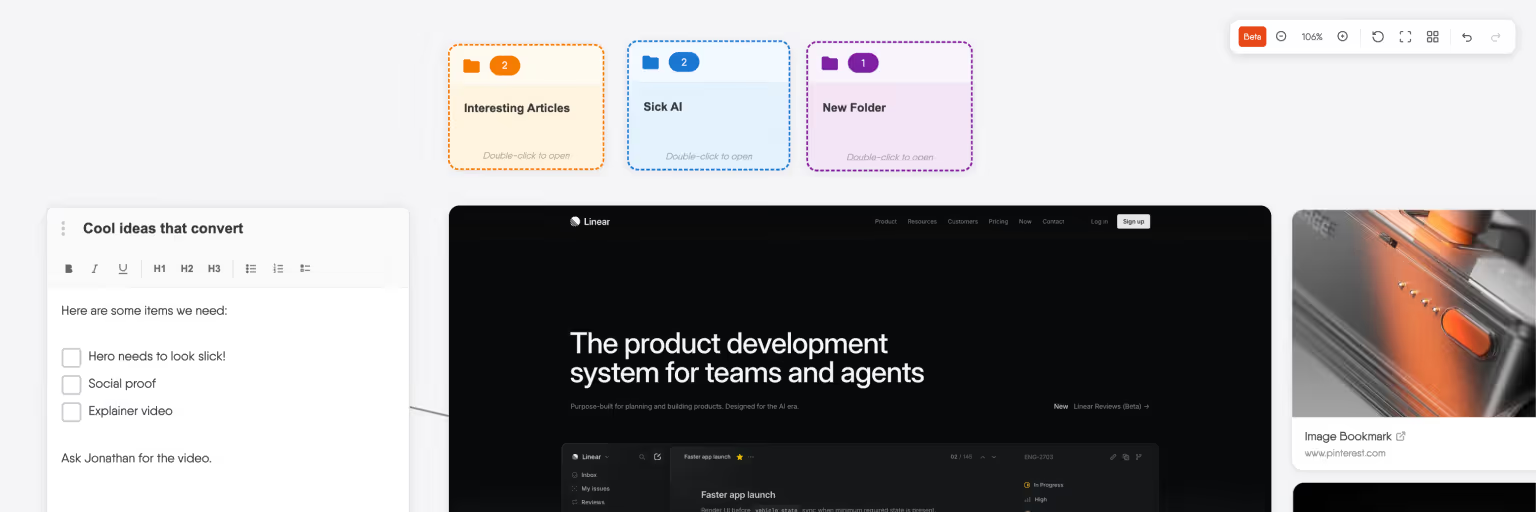
Bookmarkify approaches the canvas from a completely different angle than FigJam. Instead of starting with a blank whiteboard for brainstorming, it starts with the websites you actually want to study. Save any site through the Chrome extension, and it loads as a fully interactive preview — you can scroll through the page, click navigation, hover over elements, and test responsive behavior without leaving the app.
The infinite canvas mode lets you arrange saved websites, images, and videos spatially, resize them, create folders and pages, add notes, and draw connections between references. Six view modes — including triple grid, fullscreen, long scroll, and mobile preview — let you browse your collection across responsive breakpoints. The Design Analyse feature extracts fonts, colors, gradients, and assets from any saved website automatically.
Where FigJam gives you sticky notes and shapes on a canvas, Bookmarkify gives you live websites. For designers whose workflow centers on collecting, organizing, and studying web design references, this is a fundamentally different — and more useful — kind of canvas tool.
Best for: Web designers, UX designers, and creative teams who collect web inspiration as part of their daily workflow.
Pricing: Free plan with Grid Mode and 12 bookmarks. Pro unlocks unlimited bookmarks, all view modes, tags, dark mode, design analyse, and sharing.
Key advantage over FigJam: Live, interactive website previews on the canvas — not static screenshots. Plus six view modes including mobile preview and built-in design analysis.
2. Miro — Best for Large-Scale Workshops and Enterprise Teams
Miro is the most feature-rich whiteboard on the market, with over 60 million users and 5,000+ templates covering everything from agile retrospectives to customer journey mapping. Where FigJam keeps things lightweight, Miro goes deep — advanced facilitation tools like Smart Meetings, private mode, content reveal controls, and structured workshop frameworks through the LUMA System integration.
For enterprise design teams running multi-day strategy sessions or cross-functional workshops with dozens of participants, Miro's depth is hard to match. The integration ecosystem is broader than FigJam's, connecting with Jira, Asana, Slack, Microsoft 365, Google Drive, and more. AI-powered features include content generation, sticky note clustering, and diagram synthesis from text prompts.
The tradeoff is complexity and cost. Miro can feel overwhelming for teams that just need a quick brainstorm, and per-seat pricing adds up at $8–20/user/month for paid plans.
Best for: Enterprise teams, agencies, and product organizations running structured workshops at scale.
Pricing: Free plan (3 editable boards). Starter $8/user/month. Business $20/user/month.
Key advantage over FigJam: 5,000+ templates, advanced facilitation tools, and deeper enterprise integrations. Better for large, cross-functional sessions.
3. Milanote — Best for Visual Mood Boards and Creative Briefs
Milanote is built for creative professionals who need boards that look as good as the work they're planning. The drag-and-drop canvas supports images, text notes, links, color swatches, PDFs, videos, and to-do lists in a freeform layout. Boards have a clean, minimal aesthetic that makes them suitable for sharing directly with clients — no cleanup needed.
The web clipper saves images, links, and text from any website to your boards. Templates cover mood boards, creative briefs, storyboards, marketing campaigns, and project plans. Boards can be nested inside other boards for hierarchical organization, and read-only sharing links let clients view without creating an account.
Milanote's limitation is that saved websites appear as static link cards — there's no interactive preview or responsive testing. It's a better presentation tool than research tool.
Best for: Brand designers, art directors, and freelancers creating client-facing mood boards and creative briefs.
Pricing: Free plan (100 notes/images/links). Personal $9.99/month. Team $49/month for 10 users.
Key advantage over FigJam: Boards are visually polished enough to share directly with clients. Better content variety (color swatches, PDFs, to-do lists). Nested board organization.
4. Excalidraw — Best Free, Open-Source Whiteboard
Excalidraw is a free, open-source whiteboard with a distinctive hand-drawn aesthetic. It's intentionally simple — no account required, no setup, just open the browser and start drawing. The sketch-style rendering makes diagrams and wireframes feel informal and approachable, which is useful for early-stage ideation where polish would be premature.
Real-time collaboration works without sign-up. End-to-end encryption protects shared sessions. The tool exports to PNG, SVG, and a native .excalidraw format. A growing library of community shapes and templates adds utility without adding complexity.
Excalidraw is best for quick, disposable sketching sessions. It lacks the persistence, organization, and content richness of tools like Miro or Bookmarkify — but when you just need to draw something fast with a colleague, nothing is quicker.
Best for: Quick sketching sessions, early wireframes, and informal diagrams with no setup overhead.
Pricing: Free (open-source). Excalidraw+ with collaboration features from $7/month.
Key advantage over FigJam: No account required, fully open-source, end-to-end encrypted collaboration, and a charming hand-drawn style.
5. Raindrop.io — Best for Organizing Links and References
Raindrop.io isn't a canvas tool — it's the best pure bookmark manager available. Visual thumbnails, nested collections, tags, full-text search across saved pages, and browser extensions for every major browser. If your FigJam frustration is specifically about managing and retrieving saved links efficiently, Raindrop.io solves that with a level of organization FigJam can't touch.
The limitation is that it's a list-based organizer, not a spatial canvas. There's no infinite canvas view, no responsive device previews, and no design analysis. It organizes your links effectively but doesn't help you study or interact with them.
Best for: Designers and researchers who save large volumes of links and need fast, organized retrieval.
Pricing: Free (unlimited bookmarks). Pro $5.83/month for full-text search and advanced features.
Key advantage over FigJam: Purpose-built for persistent link saving and organization. Tags, nested collections, and full-text search across bookmarked pages.
6. Whimsical — Best for Structured Wireframes and Flowcharts
Whimsical focuses on structured visual thinking: wireframes, flowcharts, mind maps, and docs. Where FigJam is freeform, Whimsical adds helpful constraints — smart connectors that route around objects, auto-layout for flowcharts, and a wireframing kit with pre-built UI components that snap together logically.
The result is faster creation of structured diagrams. If your primary use for FigJam is mapping user flows or creating low-fidelity wireframes, Whimsical handles those specific tasks with less friction. The interface is clean and fast, with AI-powered flowchart generation from text descriptions.
Best for: Product designers and UX teams who primarily create flowcharts, user flows, and wireframes.
Pricing: Free plan (limited files). Pro $10/user/month.
Key advantage over FigJam: Smart connectors, auto-layout for flowcharts, and purpose-built wireframing components that produce cleaner structured diagrams faster.
7. Mural — Best for Enterprise Facilitation and Compliance
Mural targets the enterprise facilitation market with features like the LUMA System integration for structured innovation sessions, advanced admin controls, GDPR and CCPA compliance, and Microsoft 365 Copilot integration for AI-powered collaboration. It's trusted by most Fortune 100 companies for large-scale strategic sessions.
For design teams inside regulated industries or large enterprises with strict security requirements, Mural's compliance certifications and data governance features may be a requirement rather than a preference. The facilitation toolkit is genuinely deep — built-in timers, voting, private mode, guided activities, and structured workshop templates.
Best for: Enterprise design teams in regulated industries needing compliance-certified facilitation tools.
Pricing: Free plan (limited murals). Team+ $9.99/member/month. Business and Enterprise custom pricing.
Key advantage over FigJam: Enterprise-grade compliance (GDPR, CCPA, SOC 2), LUMA System workshop frameworks, and Microsoft 365 Copilot integration.
8. Are.na — Best for Deep Design Research and Curation
Are.na is a visual research platform with no algorithm, no ads, and no engagement optimization. Content is organized into channels that can be connected and cross-referenced, creating a web of related ideas rather than a linear feed. The community is small but deeply focused on design, art, architecture, and cultural research.
Are.na is best for designers who treat inspiration as an ongoing research practice rather than a one-time collection task. Channels evolve over months and years, building a layered understanding of topics. The limitation is that it's a public platform, making it less suited for client-specific or confidential work.
Best for: Design researchers and visual thinkers who build long-term reference collections around topics.
Pricing: Free (limited blocks). Premium $5/month for unlimited blocks.
Key advantage over FigJam: Built for ongoing research accumulation, not single-session brainstorming. No algorithm means your references stay how you organized them.
How to Choose the Right FigJam Alternative
The right choice depends on what you're missing from FigJam. If you need live, interactive website previews and design analysis, Bookmarkify is purpose-built for that workflow. If you need enterprise-scale facilitation, Miro or Mural deliver deeper workshop tools. If you need client-ready mood boards, Milanote produces the most polished results. If you need structured diagrams, Whimsical handles flowcharts and wireframes with less friction. And if you need a quick, free sketch with no setup, Excalidraw can't be beat.
Many design teams use two or three of these tools alongside FigJam rather than replacing it entirely. The key is matching each tool to the specific phase of your workflow rather than forcing one platform to handle everything.
Frequently Asked Questions
Is FigJam free to use?
FigJam is included with all Figma plans. The free Starter plan gives you unlimited personal drafts but limits you to 3 shared FigJam files. For unlimited shared files, you need the Professional plan at approximately $5/user/month. FigJam isn't available as a standalone product — it comes bundled with Figma.
What can Bookmarkify do that FigJam can't?
Bookmarkify saves websites as live, interactive previews that you can scroll through, click on, and study across different device sizes. It offers six view modes including mobile preview, and a Design Analyse feature that extracts fonts, colors, and assets from any saved website. FigJam has no equivalent to any of these — web references in FigJam are limited to static screenshots.
Which FigJam alternative is best for freelance designers?
Freelancers benefit most from tools that support the full solo workflow: inspiration collection, organization across clients, and presentation. Bookmarkify handles interactive web references with tag-based organization per client. Milanote excels at creating mood boards polished enough to share directly with clients. Raindrop.io is the best option if your primary need is link management across projects.
Can I use FigJam without paying for Figma?
Yes, but with limitations. The free Figma Starter plan includes FigJam access, but you're limited to 3 shared FigJam files. For teams needing more than occasional whiteboarding, this cap becomes restrictive quickly. Several alternatives like Excalidraw, Bookmarkify, and Raindrop.io offer meaningful free tiers without similar restrictions.
What's the best free FigJam alternative?
Excalidraw is the best completely free option — it's open-source, requires no account, and supports real-time collaboration with end-to-end encryption. Bookmarkify's free plan covers interactive web inspiration with Grid Mode. Miro's free plan gives you 3 editable boards. The best choice depends on whether you need sketching (Excalidraw), web inspiration (Bookmarkify), or structured whiteboarding (Miro).