Last updated: April 2026. All tools tested and pricing verified.
Infinite canvas tools have exploded over the past two years. Apple launched Freeform, FigJam went free, tldraw raised $10M, and suddenly every productivity app bolts on a boundless whiteboard. But for web and UI designers, most of these tools share the same fundamental problem: they treat websites as screenshots. You paste a flat image onto the canvas and lose everything that makes web design interesting — scroll behavior, hover states, responsive breakpoints, microinteractions.
This guide compares the best infinite canvas apps available in 2026, evaluated specifically for design workflows: inspiration gathering, competitive research, mood boarding, and collaborative ideation. We tested each tool for what actually matters to designers — not just "is the canvas infinite?" but "can I work with real web content on it?"
What Makes an Infinite Canvas Useful for Designers?
An infinite canvas is a digital workspace with no fixed borders — you can scroll, zoom, and place content in any direction without running out of space. Unlike a traditional document or slide, the canvas expands as your thinking does. For designers, this spatial freedom maps naturally to how creative work actually happens: nonlinear, visual, and exploratory.
But "infinite" alone isn't the differentiator. The value depends on what the canvas lets you put on it and what you can do with that content once it's there. A canvas full of sticky notes serves brainstorming. A canvas full of interactive websites serves design research. Those are different tools for different jobs.
Best Infinite Canvas Apps for Designers in 2026
1. Bookmarkify — Best for Web Design Inspiration and Research
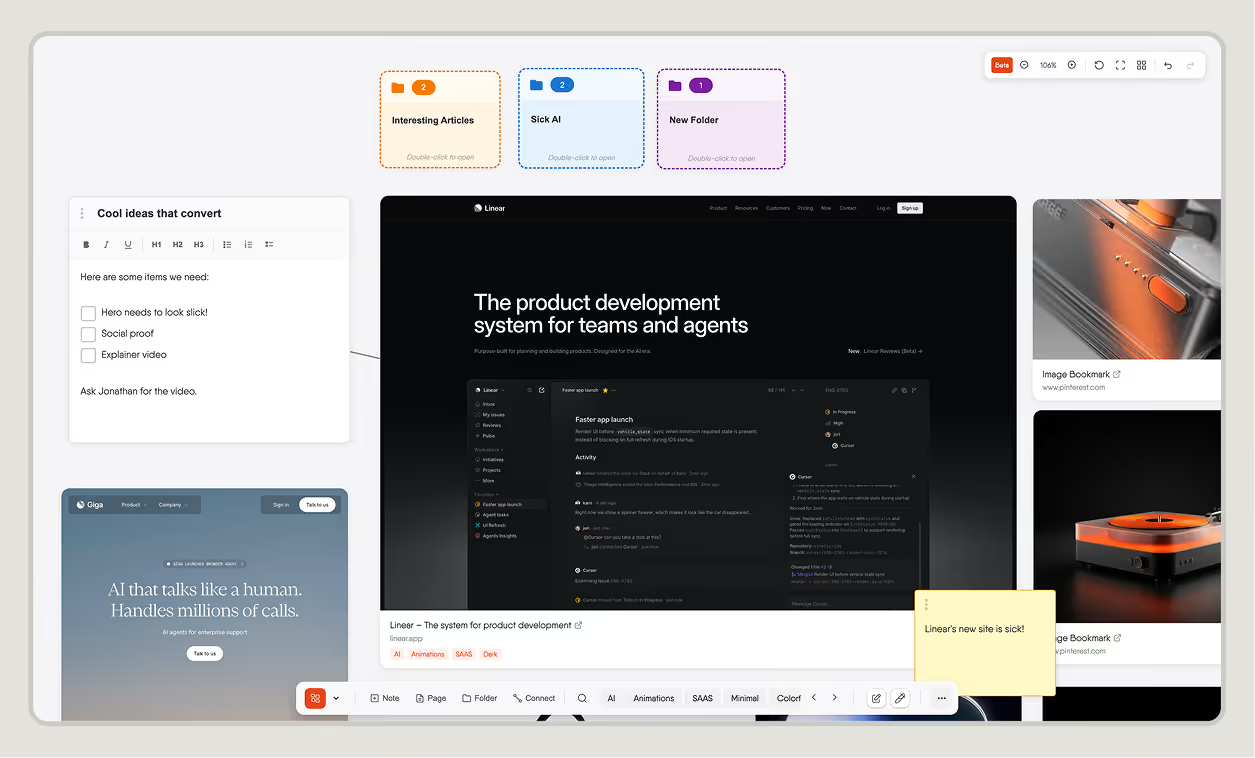
Bookmarkify is the only infinite canvas tool built specifically around interactive web content. Save any website and it stays fully functional inside an iframe on the canvas — you can scroll through it, click links, watch animations play, and check how the layout responds at different screen sizes. That last part matters most: Bookmarkify offers six view modes including mobile, tablet, and desktop previews, so you're not guessing how a reference site handles responsive breakpoints.
The canvas itself supports everything you'd expect — drag to reposition, resize cards freely, add rich text notes, create folders and pages, draw connections between content, and filter by tags. The design analyse feature lets you inspect any saved website's fonts, colors, gradients, and assets without leaving the app. Collaboration mode lets teams build shared inspiration libraries together.
Best for: Web designers, UI designers, and creative teams who collect website references and need to study them interactively — not as frozen screenshots.
Pricing: Free plan available with canvas access. Paid plans unlock expanded storage, team features, and additional design analyses.
Platforms: Web (desktop-optimized), Chrome extension for saving.
2. Miro — Best for Cross-Functional Team Collaboration
Miro is the enterprise standard for visual collaboration. Its canvas handles everything from sprint retrospectives to customer journey maps, with a template library covering virtually every business framework. Integrations with Jira, Asana, Slack, Confluence, and dozens of other tools make it the natural choice when designers work alongside product managers, engineers, and stakeholders.
For pure design inspiration work, Miro is overkill. Websites get pasted as screenshots or link cards. The interface prioritizes team workflows — voting, timers, facilitation tools — over the kind of deep design research that requires interacting with reference sites. And at $8/member/month for the Business plan, it's priced for organizations, not individual designers.
Best for: Design teams embedded in cross-functional organizations who need one workspace for everything from brainstorming to sprint planning.
Pricing: Free plan (3 editable boards). Starter $8/member/month. Business $16/member/month.
Platforms: Web, desktop (Windows/Mac), mobile (iOS/Android), tablet.
3. FigJam — Best for Designers Already in the Figma Ecosystem
FigJam is Figma's whiteboarding companion, and its tight integration with Figma files is its strongest selling point. You can embed live Figma prototypes directly onto a FigJam board, reference design system components, and move seamlessly between whiteboarding and design work. For teams already paying for Figma, FigJam is included in every plan.
Outside the Figma ecosystem, FigJam's canvas is relatively basic. It handles sticky notes, shapes, drawings, and image embeds well, but websites are static screenshots. There's no way to interact with a saved web reference or preview it at different breakpoints. The tool shines for team workshops and design critiques, less so for independent research and inspiration gathering.
Best for: Teams already using Figma who want a whiteboard that connects directly to their design files.
Pricing: Free (included with Figma). Figma plans start at $15/editor/month (Professional).
Platforms: Web, desktop (Windows/Mac), mobile (iOS/Android for viewing).
4. Milanote — Best for Mood Boards and Visual Briefs
Milanote is designed specifically for creative work — mood boards, visual briefs, storyboards, and brand explorations. Its drag-and-drop interface feels like arranging materials on a physical table. The web clipper saves images, links, and text snippets cleanly, and the visual output looks polished enough to share directly with clients without additional formatting.
Milanote treats the canvas more like a structured board than a true infinite workspace. You can create nested boards and organize spatially, but the feel is more contained than tools like Miro or Bookmarkify. Saved websites appear as link cards with preview thumbnails — not interactive. The free plan caps at 100 notes, images, or links, which active designers will hit quickly.
Best for: Freelance designers and small studios building mood boards and visual briefs for client projects.
Pricing: Free (100 items). Personal $9.99/month. Team $49/month (up to 10 users).
Platforms: Web, desktop (Mac/Windows), mobile (iOS/Android).
5. Apple Freeform — Best Free Option for Apple Users
Apple Freeform ships free with every Mac, iPad, and iPhone. It offers a genuinely infinite canvas with support for images, PDFs, sticky notes, shapes, drawings, links, and embedded media. The Apple Pencil integration on iPad is excellent, and iCloud sync keeps boards accessible across all Apple devices.
As a design tool, Freeform's limitations become clear quickly. There's no web clipper, no design-specific features, and no way to interact with saved web content. Collaboration works well within the Apple ecosystem but doesn't extend to non-Apple users. It's a solid free canvas for personal brainstorming and quick visual thinking, but it wasn't built for professional design research workflows.
Best for: Apple users who want a free, no-friction canvas for visual thinking and quick collaboration with other Apple users.
Pricing: Free (bundled with Apple devices).
Platforms: Mac, iPad, iPhone (Apple ecosystem only).
6. tldraw — Best Open-Source Canvas for Developers and Tinkerers
tldraw is an open-source infinite canvas SDK that also ships a free whiteboarding app at tldraw.com. It raised $10M in its Series A and powers canvas features inside ClickUp, Padlet, and other products. The whiteboard is fast, minimal, and genuinely good for quick sketching, diagramming, and spatial note-taking.
For designers, tldraw works best as a lightweight scratchpad rather than a full research tool. It supports drawing, shapes, text, arrows, and image embeds. There's no native web clipper, no saved website previews, and no design-specific analysis features. Where tldraw gets interesting is its AI integrations — the \"Make Real\" feature lets you sketch a UI and generate a working website, and its MCP support allows AI agents to draw directly on the canvas.
Best for: Developers and design-adjacent makers who want a fast, hackable canvas with AI capabilities.
Pricing: Free (open source). Enterprise licensing available for SDK use.
Platforms: Web (browser-based).
7. Are.na — Best for Long-Term Inspiration Archiving
Are.na occupies a unique space — it's a visual research tool built around collecting and connecting ideas over time. Content is organized into \"channels\" that can be linked and cross-referenced, creating a personal knowledge graph of visual references. The community aspect is strong: you can follow other designers' research channels and discover inspiration through human curation rather than algorithmic feeds.
Are.na is not technically an infinite canvas — it uses a grid and list layout rather than freeform spatial arrangement. Websites are saved as link cards with thumbnails, not interactive previews. It's slower and more contemplative than tools built for project-speed workflows, which is either a feature or a bug depending on how you work.
Best for: Designers who value long-term research archiving, community curation, and building a personal visual library over months and years.
Pricing: Free (limited). Premium $7/month or $60/year.
Platforms: Web, mobile (iOS/Android).
8. Notion — Best for Combining Notes With Visual References
Notion is primarily a notes and docs tool, but its database views, gallery layouts, and embedded content support make it useful for organizing design references. You can build a research database with custom properties, filter by project or style, and embed Figma files, images, and links side by side with written notes.
Notion doesn't have a true infinite canvas. Everything lives in pages and databases — structured, not spatial. For designers who think in documents rather than boards, that structure is productive. For those who need to drag content around freely, zoom between overview and detail, and think spatially, Notion won't replace a dedicated canvas tool.
Best for: Designers who organize their work in documents and databases and want references living alongside project notes and documentation.
Pricing: Free (personal). Plus $12/seat/month. Business $18/seat/month.
Platforms: Web, desktop (Windows/Mac), mobile (iOS/Android).
Infinite Canvas Apps Compared: Feature Table
ToolInfinite CanvasLive Website PreviewsResponsive View ModesDesign AnalysisWeb ClipperCollaborationFree PlanBest ForBookmarkifyYesYes — fully interactive6 modes (mobile, tablet, desktop, grid, list, fullscreen)Yes (fonts, colors, assets)Chrome extensionTeam workspacesYesWeb design researchMiroYesNo — screenshots onlyNoNoNoEnterprise-gradeYes (3 boards)Cross-functional teamsFigJamYesNo — screenshots onlyNoNoNoFull (Figma integration)Yes (with Figma)Figma ecosystem usersMilanotePartial (nested boards)No — link cardsNoNoYesTeam boardsYes (100 items)Mood boards & briefsApple FreeformYesNoNoNoNoiCloud sharingYes (free with Apple)Apple ecosystem userstldrawYesNoNoNoNoReal-time multiplayerYes (open source)Developers & tinkerersAre.naNo (grid/list)No — link cardsNoNoBrowser extensionShared channelsYes (limited)Long-term archivingNotionNo (pages/databases)NoNoNoWeb clipperFull workspaceYesNotes + references
How to Choose the Right Infinite Canvas for Your Workflow
The right tool depends on what you're actually doing on the canvas. Here's a decision framework based on common designer workflows:
If you collect website references and need to study them in detail — scroll through layouts, check responsive behavior, inspect hover states — Bookmarkify is the only tool that keeps websites interactive. Every other canvas freezes them as screenshots.
If you run team workshops, sprint planning, and cross-functional meetings — Miro or FigJam. Miro for broader organizational use, FigJam if you're already in the Figma ecosystem.
If you build mood boards and visual briefs for clients — Milanote produces the most presentation-ready boards. Bookmarkify works well for the research phase before you build the final board.
If you want a free, zero-setup canvas — Apple Freeform if you're on Apple devices, tldraw if you want a browser-based option with developer-friendly features.
If you build a long-term visual library over months and years — Are.na's community curation and cross-referencing model is designed for exactly that kind of slow, ongoing research.
The Case for Interactive Web Content on the Canvas
The gap between static and interactive canvas content matters more than most tool comparisons acknowledge. When you save a website as a screenshot, you immediately lose the information that makes it useful as a design reference: how the navigation responds to scroll, what the button hover transition looks like, how the layout reflows on a smaller viewport, whether the loading animation is smooth.
That's the problem Bookmarkify's canvas solves. Instead of flat images, you get live web pages inside resizable cards that you can arrange, annotate, and browse right on the canvas. Combined with the design analyse feature — which extracts fonts, colors, gradients, and assets from any saved site — it turns an inspiration board into an actionable research tool.
Most designers end up using multiple canvas tools for different purposes. The question isn't which one is universally \"best\" — it's which combination matches your workflow. For web design research and inspiration, a canvas that keeps websites alive gives you information that no screenshot-based tool can.
For deeper comparisons between specific tools, check out our detailed reviews: Bookmarkify vs FigJam, best Miro alternatives, Bookmarkify vs Milanote, best FigJam alternatives, and best Pocket alternatives for designers.
Frequently Asked Questions
What is an infinite canvas app?
An infinite canvas app is a digital workspace with no fixed borders — you can pan, zoom, and place content in any direction without running out of space. Unlike documents or slides, the workspace expands as your thinking does. Common uses include brainstorming, mood boarding, research mapping, project planning, and visual note-taking. Tools like Miro, FigJam, Apple Freeform, and Bookmarkify all use infinite canvas as their core interaction model.
Which infinite canvas app is best for web designers?
For web designers specifically, the key differentiator is how the canvas handles website references. Most tools — including Miro, FigJam, and Milanote — save websites as static screenshots or link cards. Bookmarkify is the only infinite canvas that keeps saved websites fully interactive inside iframe cards, letting you scroll, click, and preview them at different responsive breakpoints directly on the canvas.
Is FigJam or Miro better for designers?
FigJam is better if your team already uses Figma — the tight integration with Figma files, prototypes, and design systems makes the workflow seamless. Miro is better for cross-functional teams where designers collaborate with product managers, engineers, and stakeholders who need broader project management features. Neither tool keeps website references interactive on the canvas.
Are there free infinite canvas tools?
Several infinite canvas tools offer free plans: Apple Freeform is completely free for Apple device users, tldraw is open source and free in the browser, FigJam is included free with Figma accounts, and Bookmarkify offers a free plan with canvas access. Miro's free plan limits you to three editable boards, and Milanote's free plan caps at 100 items.
Can I save live websites to an infinite canvas?
Only Bookmarkify currently supports saving fully interactive websites to an infinite canvas. Other tools save websites as static screenshots (Miro, FigJam), link preview cards (Milanote, Are.na), or don't have a web saving feature at all (Apple Freeform, tldraw). Bookmarkify uses iframes to keep saved websites functional — meaning you can scroll, click, and interact with them directly on the canvas.
What's the difference between an infinite canvas and a whiteboard app?
All whiteboard apps use some form of canvas, but not all are truly infinite. The term \"infinite canvas\" specifically means there are no boundaries — the workspace extends in all directions without edge limits. Some whiteboard tools have large but finite canvases, or use page-based structures (like Notion). True infinite canvas apps like Miro, FigJam, Bookmarkify, and Apple Freeform let you keep expanding indefinitely.